Automation Forge File Toolkit

Copy, verify, compare, recover, and manage files with confidence.

A complete Windows file and backup workspace: dependable everyday transfers, encrypted vaults, automatic backup jobs, point-in-time recovery, folder synchronization, storage analysis, and advanced system-recovery tools.

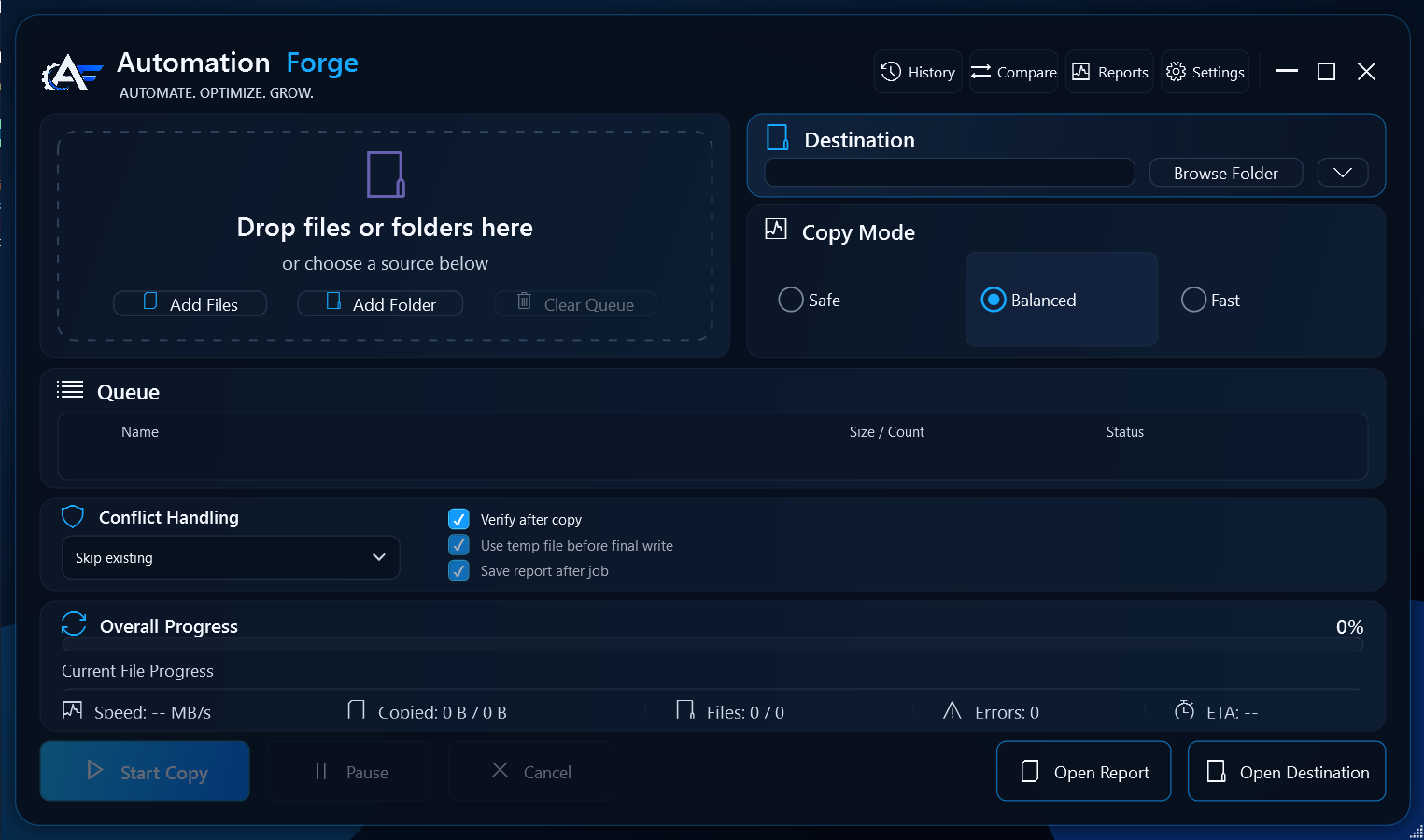
Automation Forge File Toolkit desktop interface
Current version 3.1.6

Built for dependable file work

Choose files or folders, select a destination and safety mode, verify results, compare folders, and keep a clear report of each job.

Safe stagingSHA-256 verificationFolder compareJob historyBackup recovery

Complete feature set

Far more than a copy button.

Every major customer-facing capability in the current 3.1.6 application is organized below. Advanced Windows, recovery, and cloud features clearly identify when administrator access or separate storage is required.

01

Safe everyday copying

  • Drag-and-drop files and folders into a managed queue
  • Safe, Balanced, Turbo, and Secure Vault modes
  • Skip, overwrite, or automatically rename conflicts
  • Same-folder temporary staging before final commit
  • Pause, resume, cancel, retry failures, and recover interrupted jobs
  • Preserve timestamps and file attributes
02

Verification and clear records

  • Off, Quick, CRC32, SHA-256, or byte-by-byte verification
  • Source-change detection prevents mixed or stale results
  • Separate discovery, copy, and verification progress
  • JSON job reports, report viewer, and persistent history
  • Retry only the failed files from a completed report
  • Live speed, ETA, files-per-second, resource, and bottleneck details
03

Smart performance

  • Automatic HDD, SSD, USB, network, and cloud-path detection
  • Adaptive workers and buffers based on hardware and file mix
  • Work scheduling tuned for tiny through very large files
  • Optional isolated native Windows scan, copy, and verification worker
  • Disk-backed manifests for very large, million-file jobs
  • Per-drive calibration and learned performance profiles
04

Folder compare and sync

  • Find source-only, destination-only, changed, matching, and error items
  • Optional SHA-256 content comparison
  • Copy missing or selected differences in either direction
  • Use the same staged copying and verification protections
  • Save comparison results as JSON or text
  • Explorer right-click and Send To integration
05

Automatic backup jobs

  • Save repeatable jobs for known USB and external drives
  • Ask first or run automatically when a drive is connected
  • Windows scheduled tasks that can run while signed out
  • Wildcard and recommended exclusions
  • Capacity preflight and mass-change safety stop
  • Optional success/failure email notifications and safe USB eject
06

Backup health and repair

  • Dashboard for preflight, verification, exclusions, and restore-test health
  • Incremental indexes with scheduled full reconciliation
  • Optional NTFS change-journal acceleration
  • Automatic retry health, last success, and failure details
  • Scheduled restore sampling to prove recoverability
  • Full verification intervals and repair accounting
07

Point-in-time Recovery Center

  • Signed, deduplicated complete point-in-time snapshots
  • Retain previous versions plus deletion and rename history
  • Dry-run restore planning before files are changed
  • Exact restore with verification before removing extra items
  • Content-addressed blocks reduce duplicate storage
  • Recovery certification confirms full reconstruction
08

Secure Vault encryption

  • AES-256-GCM encryption for content, names, paths, and metadata
  • Authenticated restore before plaintext is committed
  • Encrypted temporary containers and atomic final writes
  • Password changes and DPAPI-protected unattended backup access
  • Dedicated empty-vault destination safeguards
  • Ordinary copy modes remain standard readable files
09

Immutable offsite recovery

  • Customer-owned Azure storage—Automation Forge does not hold your recovery key
  • Local encryption before any snapshot object is uploaded
  • Immutable, manifest-last snapshot commits
  • Setup round-trip validation
  • Offline recovery bundles and cloud-only restore
  • Designed for a separate recovery copy, not as the only backup
10

Windows system recovery

  • Optional complete system images for critical Windows volumes
  • Selected full data-volume imaging
  • Application-consistent VSS writer coordination
  • Physical-disk safety checks prevent unsafe source/target choices
  • Catalog validation and Recovery Media launch
  • Guided WinRE bare-metal restore workflow

Administrator access and a separate physical destination disk are required.

11

Storage and Windows utilities

  • Read-only Disk Space Analyzer with largest-item and file-type views
  • Interactive proportional storage treemap
  • Conservative Registry Analyzer with restorable exports and revalidation
  • Install/uninstall monitor with hash-only registry and filesystem changes
  • Optional VSS copies for locked or changing files
  • Optional full NTFS metadata, alternate streams, sparse, compression, and EFS handling
12

Built for dependable recovery

  • Deterministic partial files with verified-byte resume
  • Durable checkpoints after cancellation, crash, or power loss
  • Network-aware retry and source stability checks
  • Atomic settings, reports, journals, and indexes
  • Single-instance Explorer request forwarding
  • Windows 10/11 desktop interface with compact and high-DPI layouts
1. Choose an optionPurchase the perpetual license or request one free trial.
2. Check your emailYour purchase or 14-day trial key is delivered to the address above.
3. Install and activateDownload the signed installer, open File Toolkit, and enter the same email and key.