Services

Focused automation for the work your team repeats every week.

Start with one repetitive task—exporting, cleaning, matching, renaming, checking, reporting, or sending—and turn it into a dependable workflow built around how your business already works.

Reports - files - Epicor - Sage - DocuWare - APIs
  • Built for real internal workflows, not generic templates.
  • Start with one painful task and prove the time savings.
  • Reply includes next steps, scope, and pricing direction.
Automation Control Center Live
Workflow

Invoice Packet Builder

Import Clean Match Export
1.8example hours reclaimed
18%example batch progress
Illustrative workflow animation—not a customer performance claim.

Works with what you use

Connect the files and systems already in your workflow.

These are examples, not an all-inclusive list. Other file types, databases, cloud services, and internal systems can be reviewed with your workflow.

Files

Excel · CSV · PDF

4 more examples
WordXMLJSONImages
Systems

Epicor · DocuWare · Sage

2 more examples
SharePointSQL databases
Connections

APIs · Email · Network folders

2 more examples
Web portalsCloud storage
Signed Windows installers14-day software trialsSecure Stripe checkoutLicense recovery support
Example builds
  • A folder watcher that renames, validates, moves, and logs incoming files.
  • A report builder that cleans CSV exports and produces consistent Excel or PDF output.
  • A lookup screen that finds orders, invoices, drawings, or related documents in one place.
What the review covers
  • The repeated steps, current inputs, and result your team needs.
  • Available sample files, system access, validation rules, and safeguards.
  • The smallest useful first version, expected timeline, and pricing direction.
Focused starting points
  • Begin with one repeated task instead of replacing an entire business system.
  • Use a purpose-built Windows tool when a large platform would add unnecessary complexity.
  • Expand only after the first workflow proves useful to the people doing the work.

What we can automate

Choose the workflow that matches the work slowing your team down.

Each project starts with one defined task, clear inputs, and a useful result your team can repeat with confidence.

Report Cleanup & Dashboards

Turn messy Excel, CSV, and PDF exports into clean reports with totals, filters, charts, and repeatable output.

Automate my reports

Folder Watchers & File Processing

Automatically rename, move, sort, log, validate, and process files the moment they arrive in a folder.

Fix my file workflow

Invoice / Order Lookup Tools

Search folders, Epicor exports, document systems, or databases from one simple screen instead of chasing files manually.

Build a lookup tool

Custom Windows Utilities

Internal desktop tools, tray apps, admin utilities, installers, workflow panels, and status dashboards.

Create a business tool

Built software

See how focused tools turn complicated work into a clear sequence.

Released products show the same practical approach used for custom automation work.

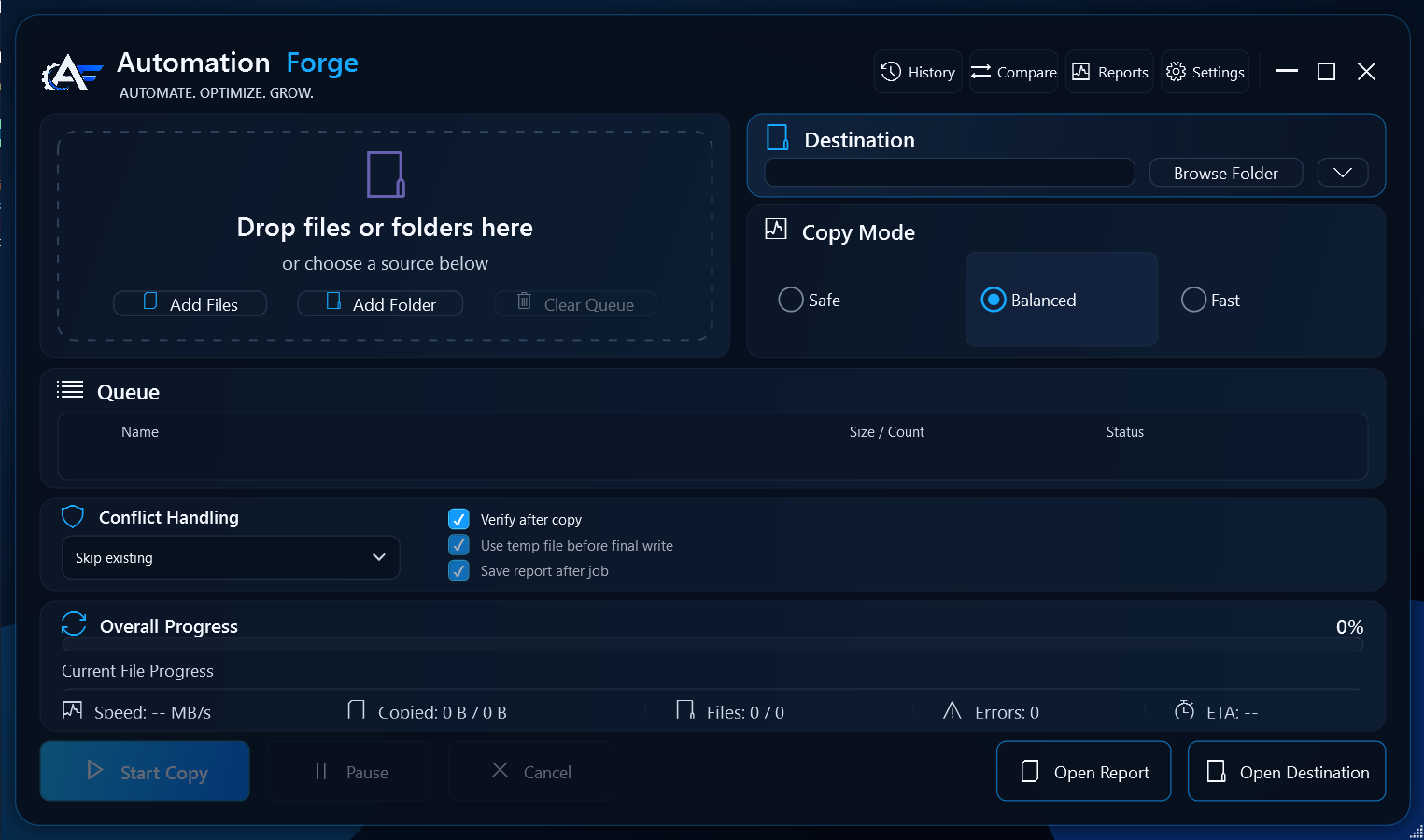
Automation Forge File Toolkit workspace
File operations

Automation Forge File Toolkit

One Windows workspace for copy verification, comparison, scheduled backups, reporting, storage analysis, encrypted vaults, and recovery.

Before: file work split between Explorer, scripts, and separate utilities.After: a guided operation with progress, verification, history, and recovery paths.
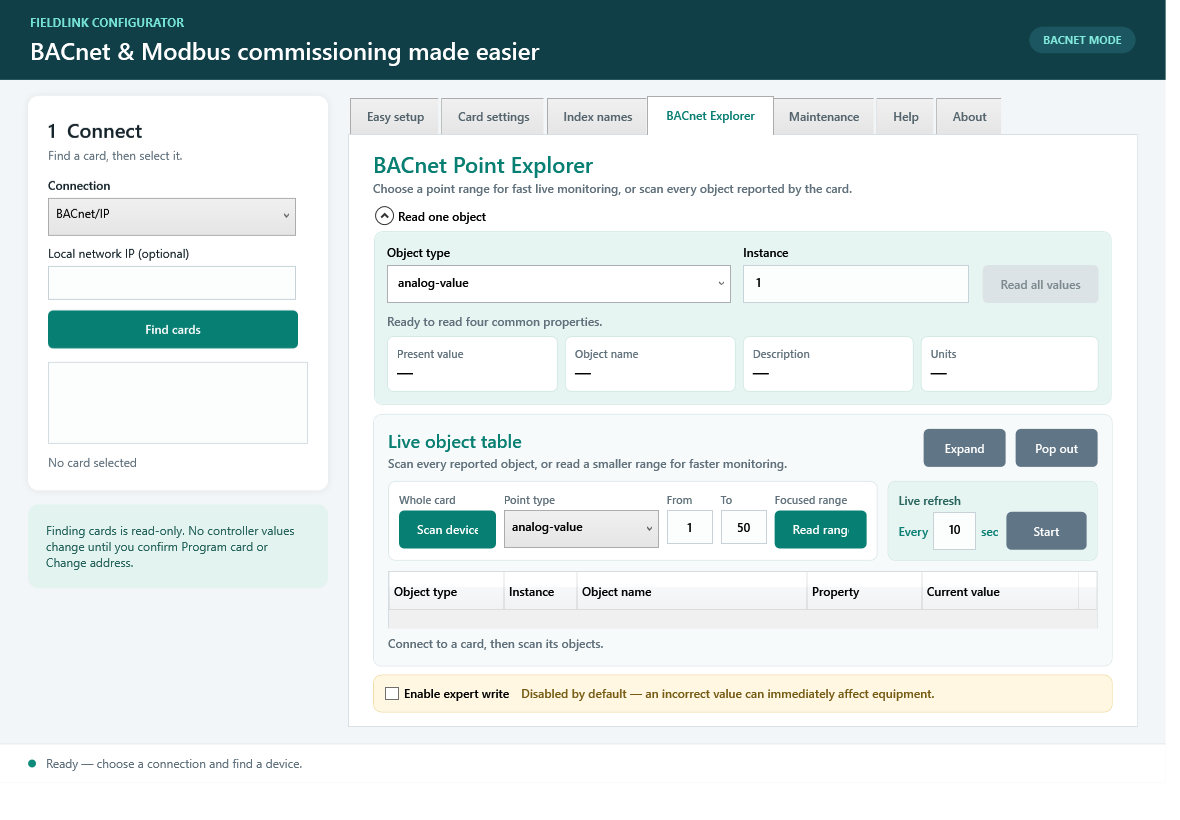
FieldLink Configurator point explorer
Building controls

FieldLink Configurator

Bring BACnet and Modbus discovery, configuration, point diagnostics, CAREL card programming, backups, and verified writes into one guided application.

Before: protocol tools, notes, and repeated manual checks.After: one visible workflow with validation and read-back verification.

Process

A simple path from manual task to working tool.

The first step is a review, not a huge commitment.

Send the workflowDescribe the manual task, attach sample files, and list the systems involved.
Review the fastest winYou get a practical recommendation for scope, package, timeline, and next step.
Build the focused toolThe first version solves one defined workflow with clear inputs, outputs, and error handling.
Polish and expandAfter the workflow proves useful, add refinements, support, or the next automation.

Pricing

Start with one focused workflow.

Compare custom automation packages, project deposits, and ongoing support on the dedicated pricing page.

Clear starting points

Starter automation begins at $750. Business tools begin at $1,500. Support begins at $250 per month.

View packages and pricing

Built by Automation Forge

Practical software starts with the work—not a generic template.

Each project is shaped around the files, systems, handoffs, and safeguards already involved in the workflow.

One clear first problemStart with a repeated task that can be explained, tested, and measured.
Visible safeguardsValidation, error handling, logs, and recovery are part of the workflow—not afterthoughts.
A useful handoffReceive a focused application, clear operating steps, and a practical path for future improvements.

Customer stories

Results, in the customer’s own words.

This section is ready for verified testimonials as completed projects and released products collect customer feedback.

Customer stories are coming.

No placeholder quotes or invented performance numbers will be published. Each future story will identify the workflow, the delivered solution, and an approved customer outcome.

Verified customerApproved wordingSpecific workflowPractical outcome

FAQ

Good questions before you spend money.

Do I need a huge software project?

No. The best first automation is usually one narrow task that wastes time every week.

Can this work with Excel, CSV, PDFs, or folders?

Yes. Those are usually the fastest wins because they are common, repetitive, and easy to measure.

Can you work with Epicor, Sage, DocuWare, or APIs?

Yes. The review starts by identifying what access, exports, folders, reports, or API connections are available.

What happens after I submit a request?

Your workflow is reviewed and you receive scope direction, questions if needed, and the best next step.

Request Review

Tell me what you want automated.

Describe the manual task, the files or systems involved, and what the finished result should look like.

  • Explain the current manual workflow
  • Attach sample files if available
  • Include preferred review times if you want a call